Open source · MIT · Windows 10 & 11

RBX FPS Booster
Lifts the cap.

Roblox locks you to 60 frames even on machines that could push more. This lightweight Windows tool unlocks that ceiling, tunes the hidden performance flags, and clears the cache in one click. Pick a preset, boost, and watch your frame rate jump.

No telemetry or trackingFree forever, MIT licensedFully reversible with Resetv2.1
Lifts frame capFour presetsClears cacheOne-click boostFully offline
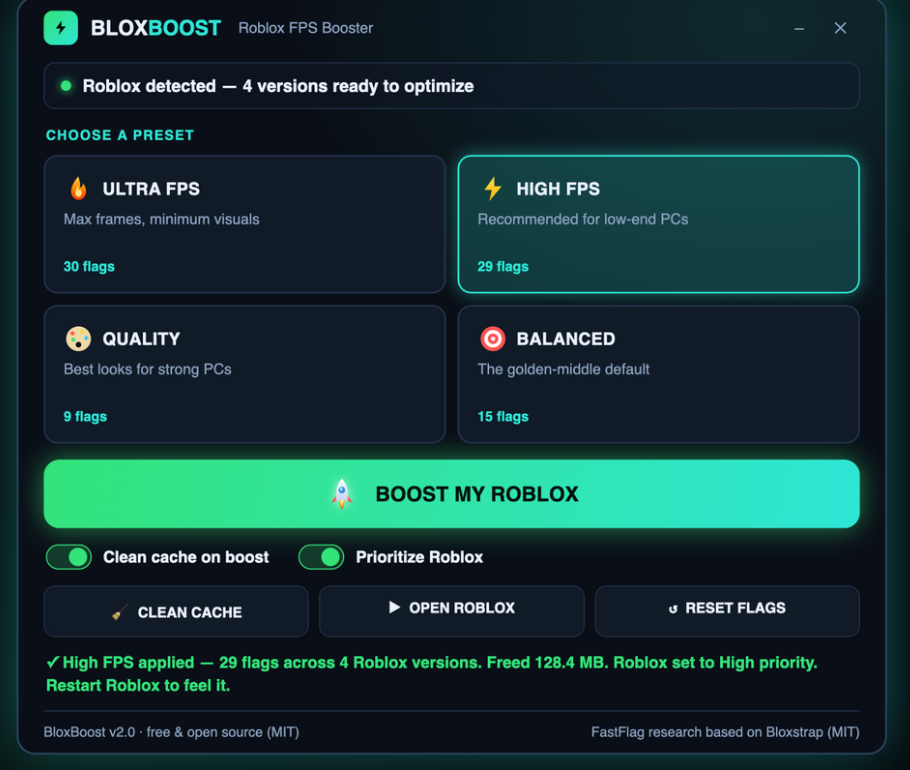
RBX FPS Booster app window on Windows
Real frame gains
Inside the appRBX FPS Booster window

See your frame rate before and after.

The difference shows the moment you hit Boost. On older laptops, you'll jump from the locked 60 to 120, 150, or higher depending on your preset. The app reports exactly what changed.

Ultra presetBare-bones visuals, unlimited frames — for the oldest machines where every frame counts.
High presetVoxel lighting, 360 FPS cap — the sweet spot for low-end PCs that need both speed and playability.
Balanced presetShadowMap lighting, 144 FPS cap — smooth gameplay without sacrificing the look of modern Roblox games.
How it works

Why RBX FPS Booster works on weak hardware.

It hits three targets: the frame cap, the graphics flags, and the CPU priority.

01

Lifts Roblox's frame cap

Classic Roblox tops out at 60 FPS by design. The tool writes Roblox's own settings file to unlock that ceiling. Your CPU gets to do what it's capable of, not what the engine throttles it to.

02

Tunes the hidden flags

Each preset adjusts lighting quality, shadow distance, and other toggles buried in Roblox's config. The changes are transparent—you can see exactly what each preset writes in the docs.

03

Clears the cache

Old log files and cached assets slow down startup and frame pacing. The tool wipes them and reports how many megabytes you reclaimed. Everything comes back the next time you play.

04

Bumps CPU priority

Sets the Roblox player to High priority so it gets steadier access to your CPU cores. Older processors feel the difference when other apps are running.

Quick start

How to boost your frame rate in four steps.

No tutorials, no account—just the dashboard and the big button.

Common questions

Questions about boosting Roblox.

Stop leaving frames on the table.

Your old laptop or budget PC is capable of more than Roblox's default cap. Download the booster, pick Ultra or High, and see the difference in seconds.

Download for Windows
Latest release · v2.1

RBX FPS Booster guides